

Every day, thousands of Kenyans open Google and type things like “pharmacy near me,” “best restaurant in Westlands,” or “plumber in Nairobi.” When your business has a Google Business Profile, it can appear right at the top of those results — complete with your phone number, location, opening hours, photos, and customer reviews.
If your business is not showing up on Google Maps or Google Search, you are losing customers to competitors who have already claimed their profiles. The good news? Creating a Google Business Profile in Kenya is completely free, and you can do it in under an hour.
In this step-by-step guide, you will learn:
- What a Google Business Profile is and how it works
- Who needs one (hint: almost every Kenyan business)
- Exactly what you need before you start
- Every step to create your profile from scratch
- How to verify your profile so it goes live
- What to do immediately after creating your profile
- Common mistakes that get profiles suspended or rejected
For a deeper dive into how to fully optimize and rank your profile after setup, read our Complete Google Business Profile Guide for Kenyan Businesses (2026 Edition).
What Is a Google Business Profile?
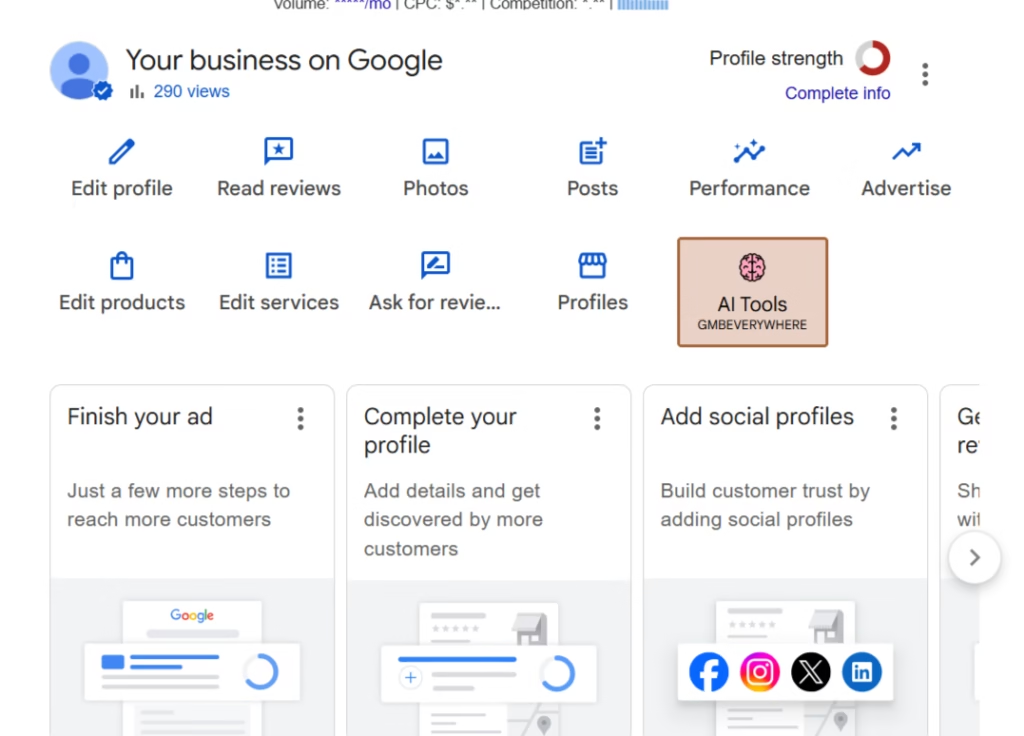
Definition of Google Business Profile
A Google Business Profile (GBP) is a free online listing that Google provides to businesses. It displays your business information — name, address, phone number, website, hours, photos, and reviews — directly on Google Search and Google Maps.
When someone searches for a business type in a specific area (for example, “dentist in Karen” or “hardware store Thika Road”), Google pulls from Business Profiles to populate the local results — the map and the three business listings that appear below it. This section is called the Local Pack, and it is prime digital real estate.
Google My Business vs Google Business Profile — What Is the Difference?
If you have heard the name “Google My Business” (GMB), you may be wondering how it relates to Google Business Profile. The answer is simple: they are the same product. Google rebranded Google My Business to Google Business Profile in 2022. You may still see older articles and tutorials using the old name, but everything now happens through Google Business Profile.
How Google Business Profile Works
When you create and verify your Google Business Profile, Google adds your business to its local index. From that point, your listing can appear when people nearby search for what you offer. Google uses your category, location, keywords, reviews, and profile completeness to decide when and how prominently to show your listing.
Benefits of Having a Google Business Profile in Kenya
Kenyan consumers increasingly rely on Google to make purchasing decisions. Here is what a complete, optimized Google Business Profile does for your business:
- More visibility — Your business appears on Google Search and Google Maps when local customers are actively looking
- More calls — Customers can tap your phone number directly from the search results
- More directions requests — People can get turn-by-turn directions to your physical location
- More website visits — Direct link to your website from your profile
- Improved local SEO — A strong profile helps you rank above competitors in your area
- Social proof — Customers can leave reviews that build your credibility
- Free marketing — You do not pay for impressions or clicks from your organic listing
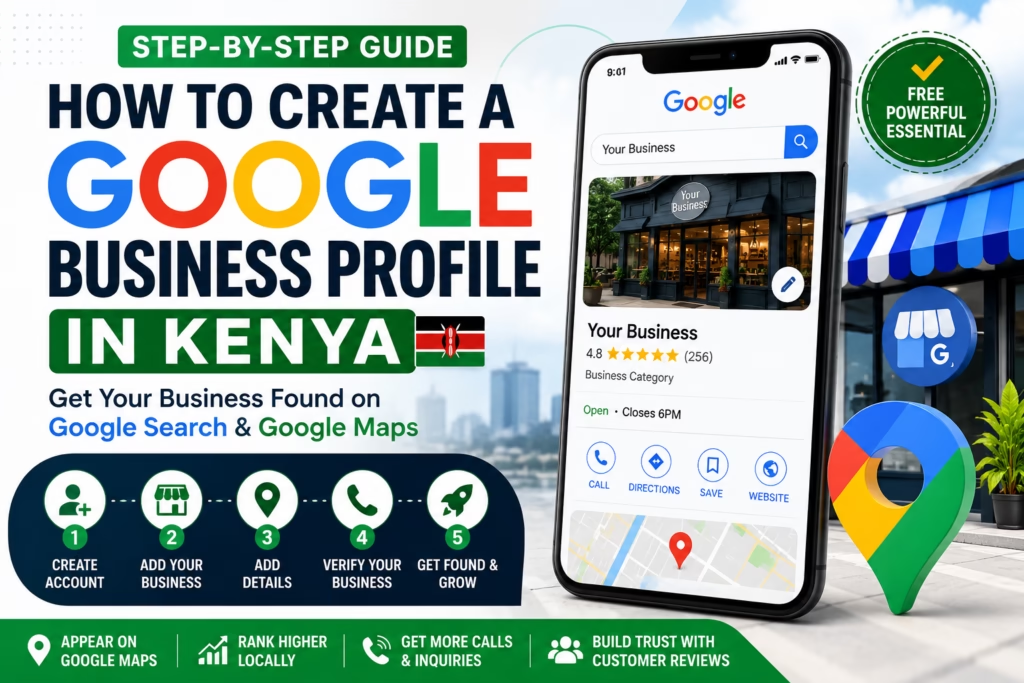
Who Should Create a Google Business Profile in Kenya?
If your business serves customers in a specific location — or within a defined service area — you need a Google Business Profile. This includes:
Retail Stores
Supermarkets, boutiques, electronics shops, hardware stores, stationery shops
Pharmacies
Retail pharmacies and medical suppliers that serve walk-in customers
Restaurants and Cafes
Any food business where customers find you by location
Hotels and Airbnbs
Accommodation providers competing for guests searching in your area
Real Estate Agencies
Agencies attracting landlords, tenants, and property buyers in specific areas
Marketing Agencies
Digital marketing firms like Neksas Digital that serve local business clients
Service-Based Businesses
Mechanics, electricians, plumbers, cleaners, event planners
Freelancers and Consultants
Lawyers, accountants, coaches, and consultants who meet clients in person or operate in defined areas
What You Need Before Creating Your Google Business Profile
Before you start the setup process, make sure you have the following ready:
A Google Account
You will need a Gmail address to sign in. Use a business email address if possible (e.g., info@yourbusiness.co.ke) rather than a personal one, so the account can be shared with team members if needed.
Your Legitimate Business Name
Use your real, registered business name. Do not add extra keywords or city names to the name — this violates Google’s guidelines and can get your profile suspended.
A Business Phone Number
Use a phone number where customers can actually reach you. A Kenyan mobile number (Safaricom, Airtel, or Telkom) works perfectly. A WhatsApp Business number is ideal.
Website (Optional but Recommended)
You do not need a website to create your profile, but having one significantly improves your chances of ranking. If you do not have one yet, even a simple landing page helps.
Physical Address or Service Area
If you have a physical location, you will need the street address. If you serve customers at their locations (like a plumber or delivery business), you will define your service areas instead.
Your Business Category
Think about how customers would describe what you do. You will select this from Google’s list during setup — for example, “Pharmacy,” “Digital Marketing Agency,” or “Restaurant.”
Step-by-Step Guide to Creating a Google Business Profile in Kenya
Follow these steps exactly. Skipping or rushing any of them can delay verification or cause your profile to be rejected.
Step 1 — Sign In to Google Business Profile
Open your browser and go to business.google.com. Sign in with your Google (Gmail) account. If you do not have one, create a free Google account first.
Once you are signed in, click “Manage now” or “Add your business to Google” to begin the setup process.
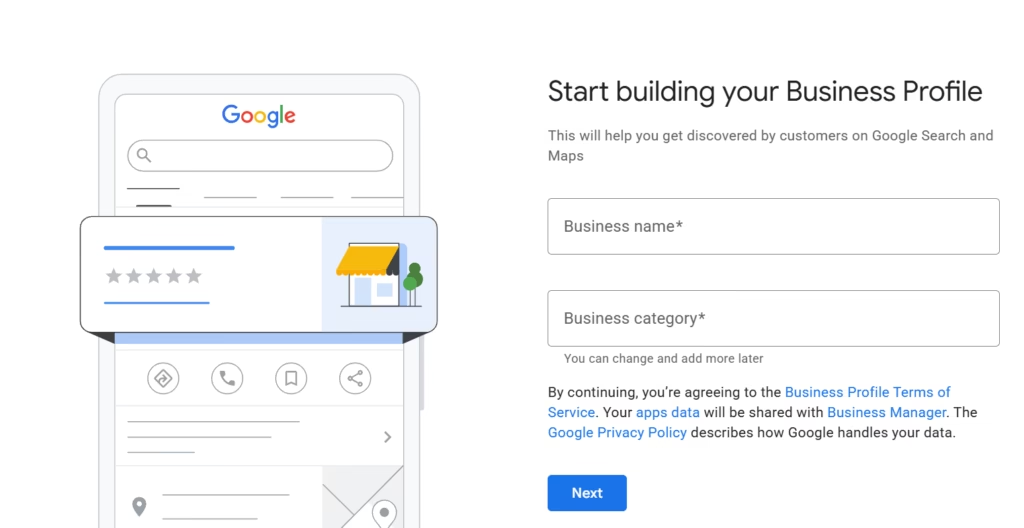
Step 2 — Enter Your Business Name
Type your exact business name in the search field. Google will show existing listings that match — if yours appears, you may already have a profile (possibly auto-generated by Google) that you can claim. If nothing matches, click “Add your business to Google.”
Best Practices for Your Business Name
- Use your real, registered business name exactly as it appears on your signage and receipts
- Do not add your city name to your business name (e.g., avoid “Neksas Digital Nairobi” — just use “Neksas Digital”)
- Do not keyword-stuff (e.g., avoid “Neksas Digital — SEO, Google Ads, Web Design Nairobi”)
- Keep it consistent across all your online platforms and marketing materials
Common Name Mistakes That Get Profiles Suspended
- Adding your location to your name: “Java House Westlands” instead of “Java House”
- Adding services: “Mama’s Salon — Hair, Nails, Beauty Nairobi”
- Using a different name from your signage or official registration
Step 3 — Choose Your Business Category
Your primary category is one of the most important decisions you will make for your Google Business Profile. Google uses it to determine when your listing is relevant to a search. Choose the category that most accurately describes your core business — not what you wish you ranked for.
Examples of categories for common Kenyan businesses:
- Retail Pharmacy → “Pharmacy”
- Digital marketing agency → “Marketing Agency” or “Internet Marketing Service”
- Restaurant → “Restaurant” or your specific cuisine type (e.g., “African Restaurant”)
- Beauty salon → “Beauty Salon” or “Hair Salon”
- Hardware shop → “Hardware Store”
- Law firm → “Law Firm”
- Real estate → “Real Estate Agency”
You can add additional categories later in your profile settings — but your primary category matters most for rankings.
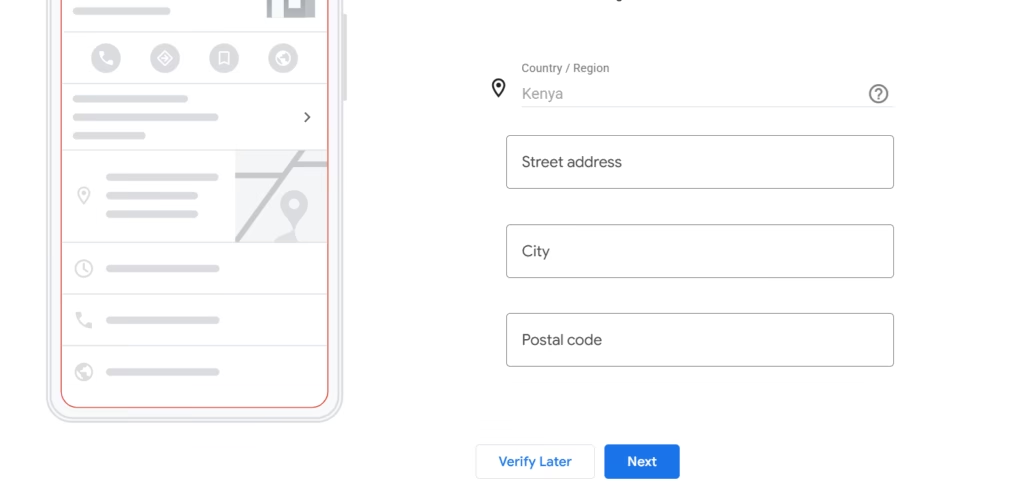
Step 4 — Add Your Business Location
Google will ask whether you want to add a physical location that customers can visit.
Businesses With Physical Locations
Select “Yes” and enter your full street address. Be as specific as possible — include the building name, floor, or estate if relevant. For example: “Ground Floor, Westgate Mall, Mwanzi Road, Westlands, Nairobi.”
Service Area Businesses
If you go to your customers rather than them coming to you (e.g., a plumber, electrician, or delivery service), select “No” and you will define your service areas in the next step.
Businesses Operating From Home
Google allows home-based businesses to hide their address from the public listing while still showing up in local search results. You can set a service area without displaying your home address.
Step 5 — Add Your Service Areas
If you serve customers across multiple areas, you can add up to 20 service areas to your profile. This helps Google show your business to people searching in those locations.
Common service areas for Nairobi-based businesses include:
- Nairobi (for city-wide service)
- Westlands, Karen, Kilimani, Parklands, Lavington, Langata
- Kiambu County (for businesses that extend to Kiambu, Ruiru, or Thika)
- Mombasa (if you offer services along the Coast)
- Nakuru or Eldoret (for businesses with upcountry coverage)
Step 6 — Add Your Contact Details
This step adds your phone number, website, and other contact methods. Make this as complete as possible — customers are more likely to contact businesses with multiple contact options visible.
Phone Number
Use your primary business number. If you use WhatsApp for business, use that number — customers in Kenya overwhelmingly prefer WhatsApp communication.
Website
Enter your full website URL (e.g., https://neksasdigital.com). If you do not have a website yet, you can leave this blank and add it later.
Booking Links
If you accept appointments (salons, clinics, lawyers, consultants), you can add a booking link — this could be a Calendly link, a booking platform, or a WhatsApp link.
WhatsApp Links
You can add a WhatsApp click-to-chat link in the additional contact fields. Format: https://wa.me/254XXXXXXXXX (replace with your number, no + sign, no spaces).
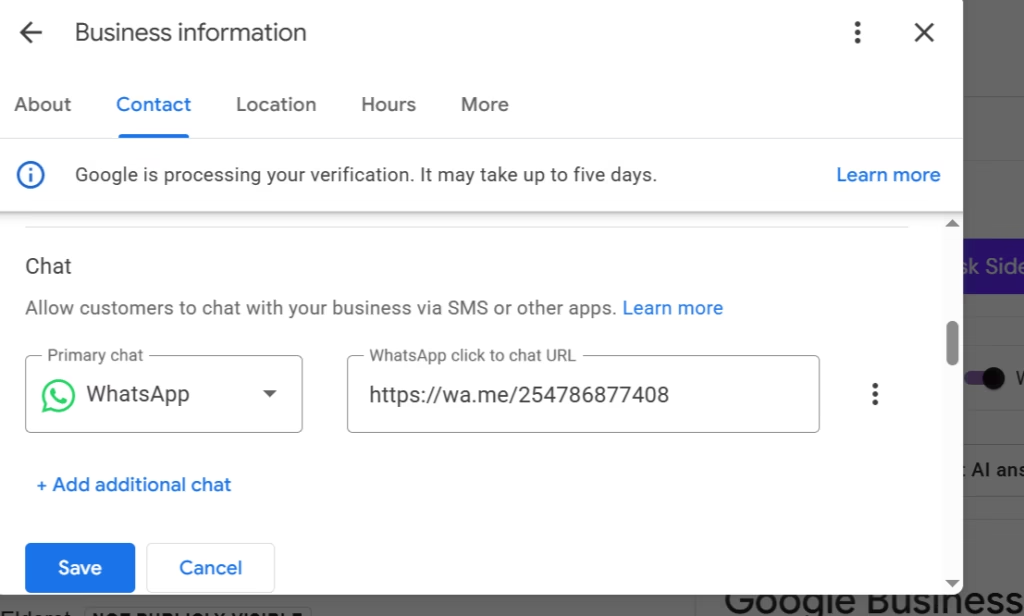
Step 7 — Complete Your Business Information
Do not rush this step. Google rewards complete profiles with better visibility. Fill in everything you can at this stage.
Business Description
Write a clear, keyword-rich description of what your business does, who it serves, and what makes it different. Keep it between 150 and 750 characters. Use natural language — write for the customer, not the algorithm. Example: “Neksas Digital is a Nairobi-based digital marketing agency helping Kenyan SMEs grow their online presence through Google Business Profile management, Google Ads, Meta Ads, and SEO.”
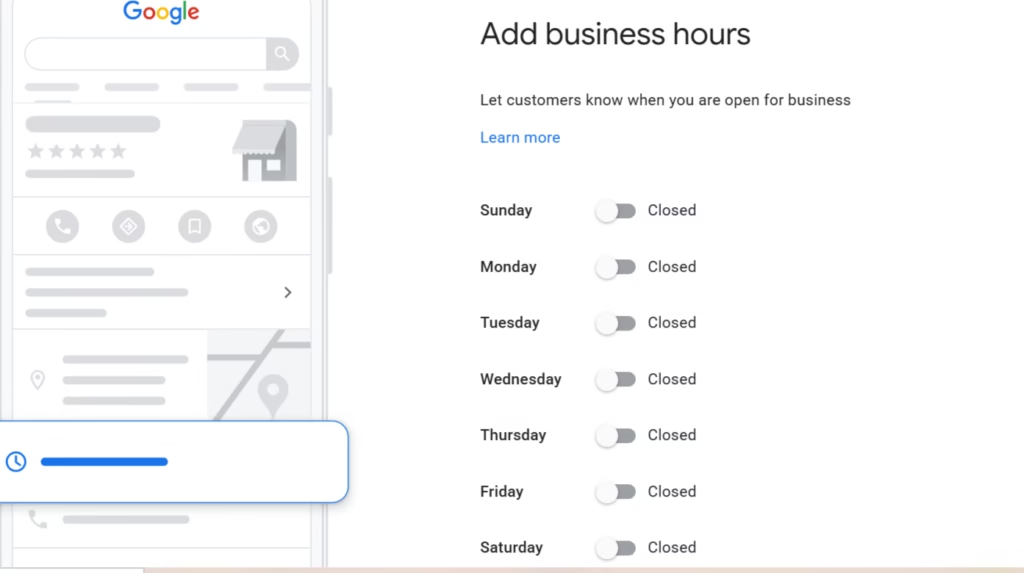
Opening Hours
Set accurate hours for each day of the week. If you close for lunch, specify that. Inaccurate hours are one of the top reasons customers leave negative reviews.
Special Hours
Add public holiday hours if your schedule changes on specific dates (Christmas, Easter, Eid, etc.).
Services
List every specific service you offer. This dramatically improves how Google matches you to relevant searches. For example, a marketing agency might list: Local SEO, Google Ads Management, Meta Ads, Web Design, Google Business Profile Management, AI Chatbots.
Products
If you sell products, add them with photos, descriptions, and prices. This is especially valuable for pharmacies, retail stores, and e-commerce businesses.
How to Verify Your Google Business Profile in Kenya
Why Verification Is Important
Creating a Google Business Profile is not enough — you must verify it before it will appear on Google Search and Maps. Verification confirms to Google that your business is real and that you are the rightful owner. An unverified profile is invisible to customers.
Available Verification Methods in Kenya
Google offers several verification methods. The options available to you will depend on your business type and location:
Video Verification (Most Common in Kenya)
Google will ask you to record a short video showing your business location, signage, and operations. You will use the Google Maps app on your smartphone to submit the video. This is currently the most common verification method for new business profiles in Kenya and typically takes 3 to 5 business days for review.
Phone Verification
Google sends a verification code to your business phone number via call or SMS. This is fast (under a minute) but is not always offered — it depends on your business type and category.
Email Verification
A code is sent to your business email. Like phone verification, this option is not available to all businesses.
Postcard Verification
Google mails a postcard with a PIN to your physical business address. This is the least common method in Kenya and can take 2 to 4 weeks. It is typically only offered when other methods are unavailable.
Tips to Pass Video Verification Successfully
Many businesses fail verification on their first attempt because their video does not meet Google’s requirements. Here is how to get it right:
- Show your business signage clearly — the name on your sign must match your Google Business Profile name exactly
- Film a continuous walkthrough of your business — do not cut or edit the video
- Show the inside of your premises and any equipment specific to your business (e.g., pharmacy shelves, salon chairs, kitchen equipment)
- Film the exterior of the building, including the street or area around you
- Make sure the address you entered matches what is visible in your video
- Use consistent business information — your profile name, address, and phone number should match any documents or receipts you have
For a detailed breakdown of every verification method and how to handle a failed verification, read our guide: How to Verify a Google Business Profile in Kenya.
What to Do Immediately After Creating Your Google Business Profile
Once your profile is created and submitted for verification, do not leave it empty while you wait. Complete as much of the profile as possible — this signals to Google that you are an active, legitimate business and can speed up how quickly your profile ranks.
Upload Your Logo
Use a clean, high-resolution version of your business logo (minimum 250 x 250 pixels, ideally 1080 x 1080 pixels). Your logo appears as your profile photo on Google Maps.
Upload a Cover Photo
Choose a high-quality image that represents your business — your storefront, your team, or your best product. The recommended size is 1332 x 750 pixels.
Add Business Photos
Businesses with photos receive significantly more clicks and direction requests than those without. Add at least 5 to 10 photos showing your location, team, products, and services.
Add Your Services
If you did not complete this during setup, do it now. List every specific service with a short description and price where applicable.
Add Products
If you sell physical products, upload them with photos, descriptions, and prices.
Publish Your First Google Post
Google Posts are short updates that appear on your profile. Publish a welcome post or a promotion to show Google your profile is active.
Enable Messaging
Turn on the messaging feature so customers can send you direct messages through your Google Business Profile. Respond promptly — Google tracks your response time.
Common Mistakes to Avoid When Creating a Google Business Profile
These are the mistakes we see most often when helping Kenyan businesses with their Google Business Profiles — and the ones most likely to get your profile suspended or rejected:
Using a Fake or Virtual Office Address
Google verifies that your listed address is a real, staffed business location. Using a virtual office, co-working space, or a P.O. Box as your primary address is against Google’s guidelines and will likely result in suspension.
Keyword Stuffing Your Business Name
Adding keywords to your business name (e.g., “Mama’s Salon — Best Hair Salon Nairobi Cheap”) violates Google’s policies. Your name should be your actual business name, nothing more.
Choosing the Wrong Category
Selecting a broad or inaccurate category reduces your chances of appearing in the right searches. Take time to find the most specific category that applies to your core business.
Creating Duplicate Listings
If you or someone else has already created a profile for your business, creating a second one will result in duplicates — which confuse customers and dilute your rankings. Always search for your business first before creating a new listing.
Leaving Your Profile Incomplete
Incomplete profiles rank lower and convert fewer visitors. Fill in every section — hours, description, services, products, photos, and attributes.
Using a Virtual Office
Many businesses try to use virtual office addresses in upmarket Nairobi areas to appear more prestigious. Google actively identifies and suspends these. Use your real business address.
How Long Does It Take for a New Google Business Profile to Appear?
Typical Timelines
Once verified, most Google Business Profiles become visible within 24 to 72 hours. However, it can take several weeks before your profile starts ranking well in competitive local searches — Google needs time to assess the quality and relevance of your listing.
Verification Delays
Video verification typically takes 3 to 5 business days. Postcard verification (where applicable) can take 2 to 4 weeks. During this time, your profile exists but is not publicly visible.
Profile Review Process
After verification, Google may still review your profile before it goes live — especially for new businesses or categories that are commonly abused. If your profile does not appear after 7 days of successful verification, you can contact Google Business Profile support through the Help Centre.
Frequently Asked Questions About Google Business Profile in Kenya
Can I Create a Google Business Profile Without a Website?
Yes. A website is optional. Many Kenyan businesses run effective Google Business Profiles without a website — especially those that rely on phone calls or WhatsApp inquiries. However, having a website significantly improves your local SEO and gives customers more confidence in your business.
Is Google Business Profile Free?
Yes, creating and managing a Google Business Profile is completely free. You pay nothing to appear on Google Search and Google Maps through your profile. The only costs involved are if you choose to run paid Google Ads separately.
Can I Use My Home Address?
Yes, but with caution. Google allows home-based businesses to list their address but hide it from the public. If you serve customers at their location, you should set a service area and hide your home address entirely. If customers visit you at home, you can show the address — but be aware that your home address will be publicly visible.
Can I Have Multiple Business Profiles?
Yes, if you have multiple distinct business locations or truly separate businesses. Each physical location of a business can have its own profile. However, you cannot create multiple profiles for the same location just to improve rankings — this is against Google’s guidelines.
Can Online-Only Businesses Create a Google Business Profile?
Google Business Profile is primarily designed for businesses with a physical presence or a defined service area. Online-only businesses (e.g., e-commerce stores that do not serve a specific geographic area) generally do not qualify. However, if your online business also serves a specific area (e.g., same-day delivery in Nairobi), you may qualify with a service area listing.
What Happens If My Verification Fails?
If your video verification is rejected, Google will notify you and you can request a new verification. Common reasons for failure include: the business name on your signage not matching your profile, the address not being visible in the video, or the video being edited or discontinuous. Review Google’s requirements carefully before resubmitting.
Need Help Creating or Optimizing Your Google Business Profile?
Setting up your Google Business Profile correctly from the start saves you weeks of troubleshooting and gives you the best possible foundation for ranking on Google Maps in Kenya.
At Neksas Digital, we specialize in helping Kenyan SMEs get found online. Our Google Business Profile services include:
- Profile creation — complete, optimized setup from scratch
- Verification support — we guide you through the video or other verification process
- Profile optimization — categories, services, photos, posts, and attributes configured for maximum visibility
- Google Maps ranking — ongoing strategy to move your business up in local search results
- Monthly management — regular posts, review responses, and performance reporting
Ready to get your business on Google Maps? Contact Neksas Digital on WhatsApp: https://wa.me/254786877408
Conclusion
Creating a Google Business Profile in Kenya is one of the highest-return, lowest-cost actions you can take to grow your business. It costs you nothing except your time, and it puts your business in front of thousands of potential customers who are already actively searching for what you offer.
Here is a quick recap of the process:
- Go to business.google.com and sign in
- Enter your real business name
- Select the most accurate category
- Add your location or service areas
- Add your contact details
- Complete your business information
- Submit for verification and complete your profile while you wait
Do not wait — every day without a Google Business Profile is a day your competitors are getting the calls, the directions requests, and the customers that could be yours.
Once you have your profile set up, explore our Complete Google Business Profile Guide for Kenyan Businesses to learn how to optimize and rank it. You can also read our step-by-step Verification Guide and our Google Business Profile Optimization Checklist.
Need professional help? Neksas Digital is here. WhatsApp us at https://wa.me/254786877408 and we will take care of ever
