

You have created your Google Business Profile. You have filled in your business name, chosen your category, added your address, and written your description. And then Google tells you that your profile will not go live until you verify it.
This is the step where many Kenyan business owners get stuck. Verification feels like a barrier. For some businesses, it takes multiple attempts. For others, it leads to frustration, delays, and a profile that sits invisible on Google for weeks.
This guide removes all that confusion. You will learn exactly what verification is, why Google requires it, which verification methods are available to businesses in Kenya, and precisely how to complete each one, including the video verification process that most Kenyan businesses will encounter.
You will also learn what to do if verification fails, how long each method takes, and what to do the moment your profile is verified so it starts ranking as fast as possible.
For a complete overview of Google Business Profile setup and optimization in Kenya, read our pillar guide: The Complete Google Business Profile Guide for Kenyan Businesses (2026 Edition).
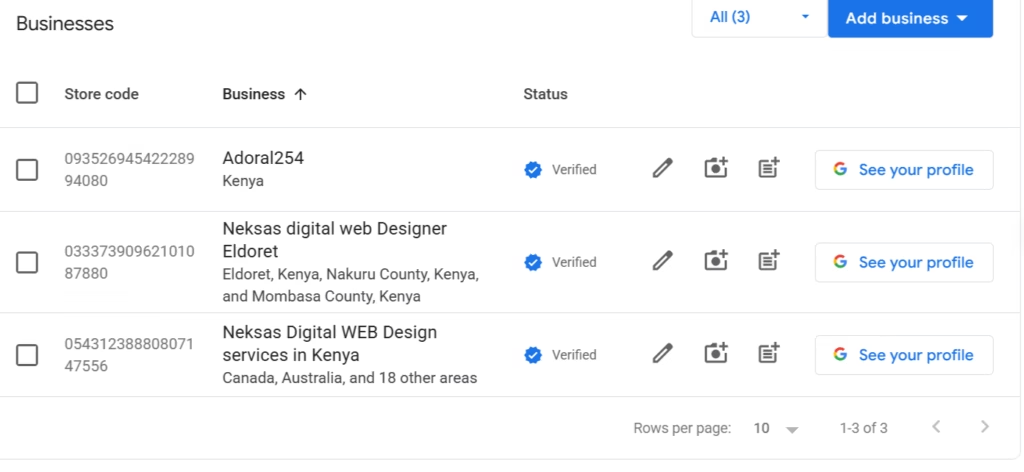
What Is Google Business Profile Verification?
Definition of Verification
Google Business Profile verification is the process Google uses to confirm that a business is real, that it is located where the profile claims, and that the person managing the profile is actually associated with that business. Until you complete verification, your profile will not appear publicly on Google Search or Google Maps.
Why Google Verifies Businesses
Google’s local search results are only valuable if users can trust them. Without a verification process, anyone could create listings for businesses they do not own, place fake businesses at competitor locations, or manipulate Maps results with false information. Verification protects the integrity of Google’s local data — and by extension, the trust customers place in search results.
How Verification Protects Customers
When a customer searches for a pharmacy, salon, or lawyer in Nairobi, they are making decisions about where to spend their money and sometimes their health and legal wellbeing. A verified Google Business Profile signals to that customer that the business exists, that someone is actively managing the listing, and that the information displayed — address, hours, phone number — has been confirmed as accurate.
What Happens After Verification
Once your profile is verified, it becomes publicly visible on Google Search and Google Maps. You gain full control over your listing — you can update business information, respond to reviews, publish Google Posts, add photos, and access performance insights showing how many people viewed, clicked, or called your business. All of this is locked until verification is complete.
Why Verification Is Important for Your Kenyan Business
Appear on Google Maps
This is the most immediate benefit. Without a verified profile, your business simply does not exist on Google Maps. Customers searching for what you offer in your area will find your competitors instead. Verification is what turns your profile from a draft into a live, discoverable listing.
Build Customer Trust
A verified profile displays a small checkmark and is treated as authoritative by Google. Customers who find your business on Maps can see that your information has been confirmed. This is particularly important in Kenya, where consumer trust is hard-won and businesses frequently deal with concerns about legitimacy and professionalism.
Manage Reviews
You cannot respond to customer reviews on an unverified profile. Reviews have a significant influence on purchasing decisions in Kenya — and the ability to respond professionally to both positive and negative reviews is one of the most powerful reputation management tools available to any business. Verification unlocks this entirely.
Update Business Information
Business hours change. Phone numbers get updated. You move to a new location. None of these changes can be made publicly on an unverified profile. Verification gives you the ability to keep your listing current so customers always have accurate information.
Improve Local SEO
Verified profiles rank significantly better than unverified ones. Google’s local ranking algorithm considers verification as a baseline trust signal. Without it, your profile will never compete effectively for visibility in local search results, regardless of how well you optimize everything else.
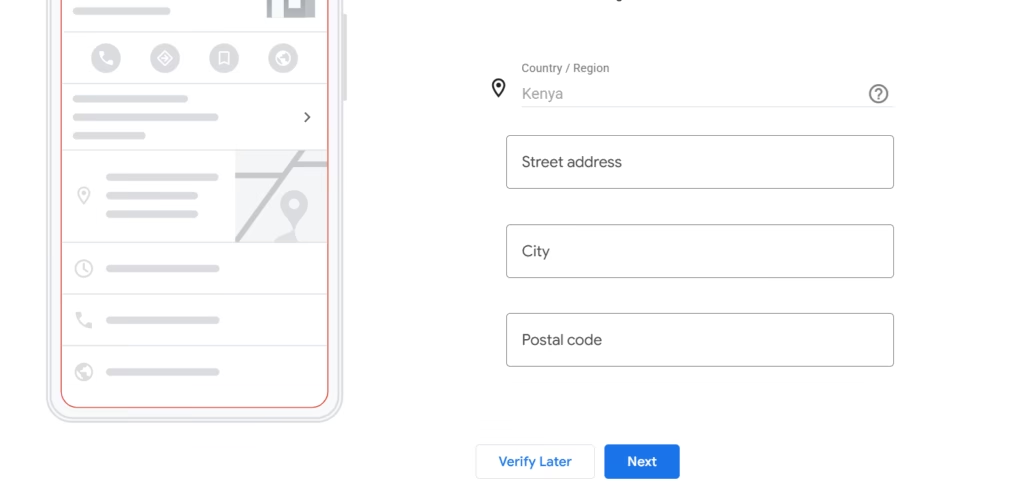
Requirements Before Verifying Your Google Business Profile
Before you attempt verification, make sure the following are in place. Missing any of these is the most common reason verification fails on the first attempt.
A Completed Google Business Profile
Your profile should be as complete as possible before you submit for verification. Business name, category, address or service area, phone number, and business description should all be filled in. A sparse or incomplete profile is more likely to be flagged for additional review.
Accurate Business Information
Every detail on your profile must be accurate and consistent. Your business name should match your signage. Your address should match any official documents you have for the business. Inconsistencies between your profile and what Google can verify during the review process will result in rejection.
Business Signage
For video verification — the most common method in Kenya — you will need to show your business name visibly displayed. This could be a painted sign above your shop, a branded banner, a window decal, or even a professionally printed reception board. The name on the signage must match the name on your Google Business Profile exactly.
Business Premises or Service Area
You need either a physical location you can film during video verification, or a clearly defined service area for service-based businesses. If you operate from a home office, your home address can be hidden while you list a service area — but you still need to demonstrate some form of business activity during verification.
A Business Phone Number
Use the phone number listed on your Google Business Profile. For phone verification, Google will call or text this number. For video verification, having your phone number displayed on your signage or receipts adds credibility.
Website (Recommended)
A business website is not required for verification, but it significantly strengthens your profile’s credibility. If you have one, make sure it is linked on your profile before you submit for verification.
Verification Methods Available in Kenya
Google offers different verification methods depending on your business type, location, and profile history. Not every method is available to every business. Here are the four methods you may encounter:
Video Verification
What Google Requires
Video verification requires you to record a short, unedited video using the Google Maps app on your smartphone. The video must show your business location from the outside, your business signage, and evidence of actual business operations inside. Google’s reviewers will watch this video to confirm that your business exists and is legitimate.
How Video Verification Works
You will be prompted to record the video through your Google Business Profile dashboard. The recording happens within the Google Maps app — you cannot upload a pre-recorded video from your camera roll. Once submitted, Google’s team reviews the footage, typically within 3 to 5 business days.
Best Practices for Video Verification
- Film in a single continuous take — do not pause, edit, or cut the video
- Start from the outside of your building, showing the street or surrounding area
- Pan clearly to your business signage so the name is legible
- Walk inside and show your business space, equipment, inventory, or workstations
- Film during business hours when your premises looks operational
- Ensure good lighting — dark or blurry footage is a common rejection reason
- Keep the video between 30 seconds and 2 minutes
Common Video Verification Mistakes
- Filming a location that does not match the address on your profile
- Business name on signage differs from your profile name (even by one word)
- Uploading an edited video — Google requires raw, uncut footage
- Filming an empty, unbranded space with no visible business activity
- Poor video quality due to low light or shaky camera
Phone Verification
How It Works
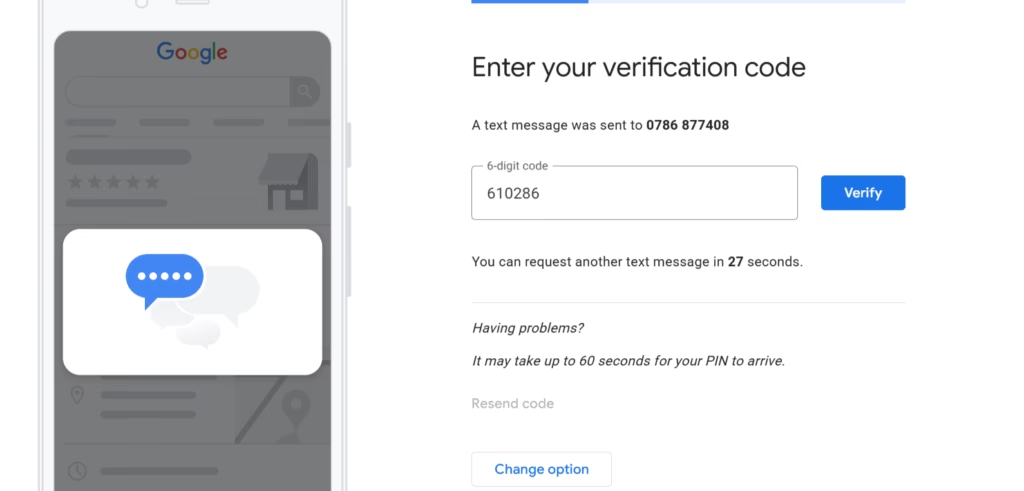
Google calls or sends an SMS to the phone number on your profile with a 5-digit verification code. You enter the code in your Google Business Profile dashboard and your profile is instantly verified. This is the fastest verification method available.
Eligibility Requirements
Phone verification is not offered to all businesses. Google typically makes it available to businesses with established phone numbers, certain categories, or profiles that Google can partially verify through other signals. If it is available to you, it will appear as an option in your verification dashboard.
Common Challenges in Kenya
Some Kenyan business owners report that the SMS code does not arrive promptly, especially on certain networks. If this happens, wait 10 minutes and request the code again. If it still does not arrive, switch to another available verification method.
Email Verification
When Google Offers Email Verification
Email verification is typically offered to businesses that have a domain email address matching their website. For example, if your profile links to neksasdigital.com and you have a Google Account with a @neksasdigital.com email, Google may offer email verification as an option. It is less commonly available than phone or video verification.
Verification Steps
Select the email verification option in your dashboard. Google sends a verification code to your listed business email. Enter the code in your profile dashboard to complete verification. This typically happens within a few minutes.
Postcard Verification
How Postcard Verification Works
Google mails a physical postcard to your business address containing a 5-digit PIN. When the postcard arrives, you log into your Google Business Profile dashboard and enter the PIN to complete verification.
Expected Waiting Time in Kenya
Postcard delivery in Kenya can take anywhere from 2 to 6 weeks, sometimes longer. This method is the slowest and least reliable option available. It is typically only offered when all other verification methods are unavailable for your business type.
Common Delivery Problems
Kenya’s postal system can be inconsistent, particularly for businesses in areas without well-defined street addresses. If your postcard does not arrive within the expected window, you can request a new one from your Google Business Profile dashboard — but you will need to wait through the full delivery period again. This is why postcard verification should only be used as a last resort.
Step-by-Step Guide to Video Verification in Kenya
Since video verification is the method most Kenyan businesses will encounter, here is a detailed walkthrough of every step.
Step 1 — Log Into Your Google Business Profile
Open your browser and go to business.google.com. Sign in with the Google account you used to create the profile. On your dashboard, you will see a prompt indicating that your profile is pending verification.
Step 2 — Select Verify Now
Click “Verify now” or “Get verified.” Google will present the verification methods available for your business. If video verification is shown, select it. You will be directed to complete the process through the Google Maps app on your smartphone.
Make sure the Google Maps app is installed and updated on your phone before you begin. Sign into the same Google account in the Maps app.
Step 3 — Record Your Verification Video
This is the most critical part of the process. Your video needs to show three distinct things: your business location, proof of ownership, and active business operations.
Show Your Business Location
Begin filming outside your business. Show the surrounding area, street, or building so Google can confirm you are at the address on your profile. Then film directly to your:
- Storefront or shop entrance
- Office entrance or lobby
- Business signage — this is essential. The name must match your profile exactly.
Show Ownership Evidence
While filming inside, briefly show documents or materials that connect you to the business. Acceptable examples include:
- A utility bill or business permit with your business name and address visible
- Branded materials such as letterheads, receipts, or packaging
- Company registration certificate if it is displayed
Show Business Operations
Google needs to see that this is an active, operating business — not an empty room. Show:
- Product inventory on shelves (for retail shops, pharmacies, hardware stores)
- Equipment specific to your trade (kitchen equipment, salon chairs, medical devices, computers)
- Workstations or service areas that reflect your business category
- Staff at work if available — this is one of the strongest signals of a legitimate, active business
Step 4 — Submit Your Video
Once you have recorded everything in a single continuous take, submit the video through the Google Maps app. You will receive a confirmation that your video has been submitted and is under review.
Do not make any significant changes to your profile while verification is pending. Changing your business name, address, or category during this period can reset the verification process.
Step 5 — Wait for Google’s Review
Google’s team will review your video, typically within 3 to 5 business days. You will receive an email notification when the review is complete. If your profile is verified, it will go live immediately. If the verification is rejected, Google will notify you with a reason and you can resubmit.
What Google Looks For During Verification
Business Existence
The most fundamental check: does this business actually exist? Google reviewers confirm that there is a real, physical location or service operation at the address listed on the profile.
Physical Presence
For businesses with a physical address, Google confirms that the premises shown in the verification video match the address provided. The exterior, signage, and surrounding environment all contribute to this confirmation.
Ownership Proof
Google verifies that the person submitting the verification has a legitimate connection to the business. This is why showing branded materials, documents, or signage that matches your profile name matters so much.
Business Activity
An empty, staged, or inactive space raises red flags. Google wants to see that your business is actually operating — that there is inventory, equipment, staff, or other evidence of ongoing commercial activity appropriate to your category.
Consistent Information
Everything Google sees in your verification video — business name on signage, location, type of business — must be consistent with what is on your profile. Any discrepancy, even a minor one like an abbreviated name or a slightly different spelling, can result in rejection.
Common Reasons Google Business Profile Verification Gets Rejected
Missing Business Signage
This is the single most common rejection reason for Kenyan businesses. If your business name is not visibly displayed on a sign, banner, or professional display that matches your profile name exactly, Google cannot confirm your business identity. Before recording your verification video, ensure your signage is clearly visible and correctly spelled.
Fake or Inaccurate Addresses
If the location you film does not match the address on your profile — or if Google can determine through other means that the address is not a real business location — verification will be rejected. Never use an address that is not genuinely associated with your business.
Shared Offices
Multiple businesses operating from the same address can trigger additional scrutiny. If you share an office, coworking space, or commercial building with other businesses, Google may require additional evidence that yours is a distinct, legitimate operation at that location.
Virtual Offices
Google actively identifies virtual office addresses and rejects verifications from these locations. If you have listed a virtual office address to appear based in a prestige Nairobi location (such as Westlands or Upper Hill), your verification will be rejected. Use your real business address.
Poor Video Quality
Dark footage, shaky camera work, a video that is too short, or footage that does not clearly show the required elements will result in rejection. Film in daylight or a well-lit space, hold your phone steady, and take your time to show each required element clearly.
Incomplete Business Information on the Profile
Attempting to verify a profile that has significant gaps — no phone number, no category, an incomplete description — can result in rejection or requests for additional review. Complete your profile as fully as possible before submitting for verification.
What to Do If Verification Fails
Review Google’s Feedback
When Google rejects a verification, the notification will typically include a reason. Read this carefully before taking any action. Understanding exactly why your verification failed saves you from repeating the same mistake in your next attempt.
Update Incorrect Information
If rejection was due to a mismatch between your profile information and what Google observed, update your profile accordingly. Make sure your business name, address, phone number, and category are all accurate before resubmitting.
Record a Better Verification Video
If your video did not meet Google’s requirements, take time to improve it before resubmitting. Address every element Google requires: exterior location, clear signage, ownership evidence, and visible business operations. Film during the day in good lighting. Use a newer smartphone if your current device produces low-quality footage.
Contact Google Support
If you believe your verification was incorrectly rejected — or if you have made corrections and are still being rejected — contact Google Business Profile support through the Help Centre at support.google.com/business. Explain your situation clearly and provide any relevant documentation.
Request Another Verification Attempt
You can request a new verification attempt from your Google Business Profile dashboard. There is no hard limit on the number of attempts, but repeated failed verifications can trigger longer review periods and additional scrutiny. Make sure you have addressed all identified issues before resubmitting.
Verification Tips for Specific Kenyan Business Types
Retail Shops
Show your shopfront, your signage, your product displays, and your till or checkout area. If you have a business permit or trade license displayed on the wall, film it briefly. Retail shops with clear product inventory and branded signage have very high verification success rates.
Pharmacies
Show your dispensary counter, your shelving with clearly organized medicines, your pharmacy permit (required by the Pharmacy and Poisons Board), and your branded signage. The pharmaceutical permit is excellent ownership evidence for Google’s reviewers.
Restaurants
Show the exterior of your restaurant, your sign, your dining area, your kitchen or preparation area, and ideally your menu — either on the wall or as a physical menu. If you have staff present during filming, include them in the video.
Marketing Agencies
Office-based agencies should show their office entrance, any branding displayed in the reception or on the door, workstations with computers and equipment, and any branded materials (letterheads, proposals, business cards). If your agency name is on the building directory, film that as well.
Home-Based Businesses
If you operate from home but serve clients at their locations, you can set a service area on your profile and hide your home address. For verification, you will still need to show some form of business operation — typically your work equipment, branded materials, and a brief introduction on camera confirming who you are and what your business does.
Service Area Businesses
Plumbers, electricians, cleaners, delivery businesses, and other service-area operators should show their vehicle (branded if possible), their tools and equipment, and any branded workwear or materials. If you have an office or storage space, include it. The key is demonstrating that a real, active business exists.
How Long Does Google Business Profile Verification Take in Kenya?
Video Verification Timelines
Video verification is reviewed by Google’s team, typically within 3 to 5 business days. During peak periods, it can take up to 7 business days. You will receive an email when the review is complete.
Phone Verification Timelines
Phone verification is the fastest method. The code arrives within seconds to a few minutes. Once you enter the code, verification is immediate.
Email Verification Timelines
Email verification codes typically arrive within a few minutes. Once you enter the code, verification completes instantly.
Postcard Verification Timelines
Postcard delivery to Kenyan business addresses typically takes 2 to 6 weeks. Urban Nairobi addresses tend to receive postcards faster than peri-urban or upcountry locations. If the postcard does not arrive within 30 days, request a new one from your dashboard.
What to Do Immediately After Your Profile Is Verified
Verification is the beginning, not the end. The moment your profile goes live, take these steps to maximize your visibility and start attracting customers.
Add Photos
Businesses with photos receive significantly more engagement than those without. Upload a minimum of 10 high-quality photos: your storefront, your interior, your team, your products or services, and your logo. Add more over time — Google favors profiles that are regularly updated.
Add Services
List every specific service you offer with a brief description. For a digital marketing agency, this might include: Local SEO, Google Ads Management, Meta Ads, Google Business Profile Management, Web Design, AI Chatbots, and Lead Generation. For a pharmacy, list your dispensing categories, clinic services, or delivery offering.
Add Products
If you sell physical products, add them with photos, descriptions, and prices. This is particularly effective for retail shops, pharmacies, restaurants, and beauty businesses.
Publish Your First Google Post
Write a short welcome post or promotion and publish it. This signals to Google that your profile is active and managed. Aim to publish at least one Google Post per week going forward.
Collect Reviews
Customer reviews are one of the most powerful local SEO ranking signals and the most convincing trust signal for new customers. Start asking your existing customers to leave Google reviews immediately. Share your profile link directly via WhatsApp or SMS to make it easy for them.
Optimize Your Profile
Full optimization goes beyond the basics. For a complete checklist of everything you should do to rank higher on Google Maps in Kenya, read our Google Business Profile Optimization Checklist.
Frequently Asked Questions About Google Business Profile Verification in Kenya
Why Can’t I Verify My Google Business Profile?
The most common reasons include: your business category is ineligible for a Google Business Profile (online-only businesses with no physical location or service area), your profile has been flagged for policy violations, or you are using an address that Google has identified as a virtual office or mail drop. Review your profile for policy compliance and make sure your address is a real business location before reattempting.
Can I Verify Without a Physical Address?
Yes. Service area businesses — plumbers, electricians, cleaners, consultants, and similar — can verify without a physical business address. You will define a service area instead of listing an address, and your verification video should focus on your equipment, vehicle, branded materials, and business operations rather than a physical premises.
How Many Times Can I Attempt Verification?
There is no official limit on the number of verification attempts. However, repeated failed attempts can result in longer review periods and increased scrutiny. Each time you resubmit, make sure you have fully addressed the reason for the previous rejection.
Can I Change My Address After Verification?
Yes, but changing your address after verification will trigger a re-verification process. Google needs to confirm that the new address is also a legitimate business location. If you are moving your business, update your address and be prepared to go through verification again.
What Happens If My Profile Gets Suspended?
A suspension is different from a failed verification. Suspensions happen when Google determines that your profile violates its guidelines — common reasons include keyword stuffing in your business name, a fake address, duplicate listings, or operating in a category that requires a physical location you do not have. If your profile is suspended, you will need to submit a reinstatement request through the Google Business Profile support page, correct the violating information, and wait for a manual review. This process can take 2 to 4 weeks.
Can I Verify More Than One Location?
Yes. If your business has multiple physical locations (for example, a chain of pharmacies or a restaurant with two branches), each location needs its own Google Business Profile and its own separate verification. Businesses with 10 or more locations may be eligible for bulk verification through Google Business Profile’s chain management tools.
Need Help Verifying Your Google Business Profile?
Verification is straightforward when you know exactly what Google is looking for. But if you are short on time, struggling with repeated rejections, or unsure how to film the right video for your specific business type, professional help is available.
At Neksas Digital, we guide Kenyan businesses through every stage of their Google Business Profile — from initial setup to verification to full Google Maps optimization. Our services include:
- Verification support — guidance on exactly what to film and how to submit
- Google Business Profile setup — complete, optimized profile creation from scratch
- Google Maps optimization — ranking your verified profile above local competitors
- Suspension recovery — reinstatement support for suspended profiles
- Ongoing monthly management — posts, review responses, and performance reporting
Contact Neksas Digital on WhatsApp: https://wa.me/254786877408
Conclusion
Verification is the single most important step between creating your Google Business Profile and actually showing up on Google Maps and Search. Without it, your profile does not exist as far as your customers are concerned.
Here is a quick recap of what you have learned in this guide:
- Verification confirms your business is real and that you are the legitimate owner
- The most common method in Kenya is video verification, which takes 3 to 5 business days
- Your video must show your location, your signage, and active business operations in a single unedited take
- Common rejection reasons include missing signage, inaccurate addresses, virtual offices, and poor video quality
- If verification fails, review Google’s feedback, correct the issues, and resubmit
- Once verified, complete your profile immediately — add photos, services, products, and your first Google Post
Do not let verification delays stop you from getting on Google Maps. Follow this guide, film your video carefully, and submit with confidence.
Once your profile is live, read our Complete Google Business Profile Guide for Kenyan Businesses to learn how to rank higher than your competitors. You can also revisit our profile creation guide or work through the Google Business Profile Optimization Checklist to make the most of your verified listing.
Need hands-on help? Neksas Digital is ready. WhatsApp us at https://wa.me/254786877408 and let us handle your verification from start to finish.
